
Samba server is used as a Domain Controller as well as creating network share which can be used to transfer data between windows and Linux.
NOTE: Make sure you take a backup of all the configuration files before making any changes
Prerequisites:
Make sure you have samba package in your machine
# rpm -qa | grep samba
samba-client-3.5.10-125.el6.i686
samba4-libs-4.0.0-23.alpha11.el6.i686
samba-common-3.5.10-125.el6.i686
samba-winbind-clients-3.5.10-125.el6.i686
samba-3.5.10-125.el6.i686
If the samba package is not there in your system then you can install it using
# yum -y install samba
To make a samba share accessible for any user
# vi /etc/samba/smb.conf
(remove all the lines and make the following entry)
security = share
workgroup = EXAMPLE
hosts allow 127. 10.10.10. 192.168.0.

[profiles]
path = /profiles
share modes = yes
guest only = yes
browseable = yes
writable = yes
guest ok = yes
create mode = 0777
directory mode = 0777
Check your firewall and selinux settings settings as in my case I have disabled both.
# service iptables stop
You will have to restart your machine after making changes in selinux config file
# vi /etc/selinux/config
# This file controls the state of SELinux on the system.
# SELINUX= can take one of these three values:
# enforcing - SELinux security policy is enforced.
# permissive - SELinux prints warnings instead of enforcing.
# disabled - No SELinux policy is loaded.
SELINUX=disabled
# SELINUXTYPE= can take one of these two values:
# targeted - Targeted processes are protected,
# mls - Multi Level Security protection.
SELINUXTYPE=targeted
Restart the samba server services
# service smb restart
# service nmb restart
Try to access your samba share using your windows client
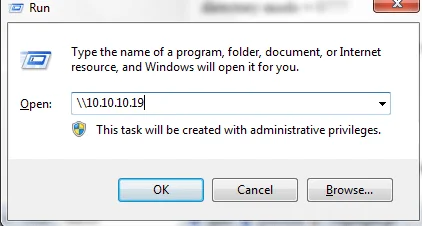
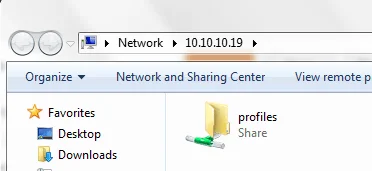
In my case the server IP is 10.10.10.19
To make a samba share accessible for predefined user (deepak)
# vi /etc/samba/smb.conf
(remove all the lines and make the following entry)
security = user
workgroup = EXAMPLE
hosts allow 127. 10.10.10. 192.168.0.

[profiles]
path = /profiles
writable = yes
create mode = 0770
directory mode = 0770
share modes = yes
guest ok = no
valid users = deepak
Assigning samba password to any user
# smbpasswd -a (username)
New SMB password:
Retype new SMB password:
# service smb restart
# service nmb restart
Try to access your samba share using your windows client
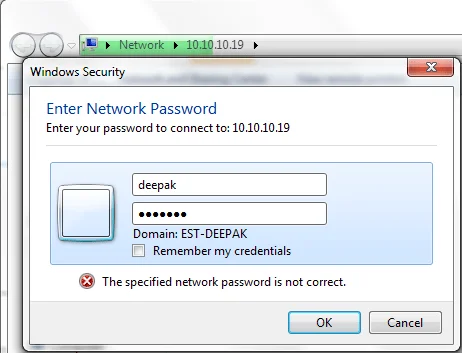
Follow the below links for more tutorials:
Configure Red Hat Cluster using VMware, Quorum Disk, GFS2, Openfiler
Tutorial for Monitoring Tools SAR and KSAR with examples in Linux
How to secure Apache web server in Linux using password (.htaccess)
How to register Red Hat Linux with RHN (Red Hat Network )
Red hat Enterprise Linux 5.5 Installation Guide (Screenshots)
15 tips to enhance security of your Linux machine
What is the difference between "su" and "su -" in Linux?
What is kernel-PAE in Linux?
What is swappiness and how do we change its value?
How to log iptables messages in different log file
What are the s and k scripts in the etc rcx.d directories
How to check all the currently running services in Linux
What is virtual memory, paging and swap space?