
This article gives you an overview of transition from System V init scripts to Systemd.
Some of the benefits of systemd over the traditional System V init facility include:
- systemd never loses initial log messages
- systemd can respawn daemons as needed
- systemd records runtime data (i.e., captures stdout/stderr of processes)
- systemd doesn't lose daemon context during runtime
- systemd can kill all components of a service cleanly
Transition of sysv init scripts to systemd
- In earlier Red Hat releases before RHEL 7 runlevels were used to identify a set of services that would start or stop when that runlevel was requested.
- Now starting with Red Hat Enterprise Linux 7 runlevel concept is remove and is replaced with "targets" to group together sets of services that are started or stopped. Systemd has replaced sysVinit as the default service manager.
- Some of the sysVinit commands have been symlinked to their RHEL 7 counterparts, however they may eventually be deprecated in favor of the standard systemd commands in the future
- A target can also include other targets (for example, the multi-user target includes an nfs target).
- There are systemd targets that align with the earlier runlevels.
The following list shows how systemd targets align with traditional runlevels:
Traditional runlevel      New target name     Symbolically linked to...
Runlevel 0           |    runlevel0.target -> poweroff.target
Runlevel 1           |    runlevel1.target -> rescue.target
Runlevel 2           |    runlevel2.target -> multi-user.target
Runlevel 3           |    runlevel3.target -> multi-user.target
Runlevel 4           |    runlevel4.target -> multi-user.target
Runlevel 5           |    runlevel5.target -> graphical.target
Runlevel 6           |    runlevel6.target -> reboot.target
Comparison of SysV Runlevels with systemd targets
| Runlevel | Target Units | Description |
| 0 | runlevel0.target, poweroff.target | Shut down and power off the system. |
| 1 | runlevel1.target, rescue.target | Set up a rescue shell. |
| 2 | runlevel2.target, multi-user.target | Set up a non-graphical multi-user system. |
| 3 | runlevel3.target, multi-user.target | Set up a non-graphical multi-user system. |
| 4 | runlevel4.target, multi-user.target | Set up a non-graphical multi-user system. |
| 5 | runlevel5.target, graphical.target | Set up a graphical multi-user system. |
| 6 | runlevel6.target, reboot.target | Shut down and reboot the system. |
View and change default target (runlevel)
The default runlevel (previously set in the /etc/inittab file) is now replaced by a default target.
The location of the default target is /etc/systemd/system/default.target.
To view the existing default target use the below syntax:
[root@golinuxhub ~]# systemctl get-default
 graphical.target
We can also validate the same by checking the symlink of the default.target
[root@golinuxhub ~]# ls -l /etc/systemd/system/default.target
 lrwxrwxrwx. 1 root root 36 Aug 20 12:58 /etc/systemd/system/default.target -> /lib/systemd/system/graphical.target
So as you see since the default.target is linked to graphical.target hence the same is set as default.
To set the default target to a different target level using the below syntax:
[root@golinuxhub ~]# systemctl set-default multi-user.target
 Removed symlink /etc/systemd/system/default.target.
 Created symlink from /etc/systemd/system/default.target to /usr/lib/systemd/system/multi-user.target.
Now validate the same
[root@golinuxhub ~]# ls -l /etc/systemd/system/default.target
 lrwxrwxrwx. 1 root root 41 Dec 24 23:31 /etc/systemd/system/default.target -> /usr/lib/systemd/system/multi-user.target
If the server is in rescue mode or in a chrooted environment, the default target can be set with the following command syntax:
# ln -sf /lib/systemd/system/<desired>.target /etc/systemd/system/default.target
Change the current target (runlevel)
In RHEL 6 this was done using telinit runlevel
In RHEL 7 you must use below syntax
# systemctl isolate name.target
For example
[root@golinuxhub ~]# systemctl isolate rescue.target
 PolicyKit daemon disconnected from the bus.
 We are no longer a registered authentication agent.
Since I switched to runlevel 1 I got disconnected from my termincal and if you see below screen I have logged in to the rescue mode
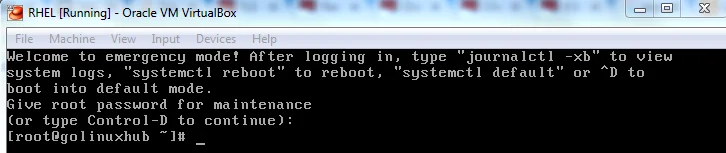
Changing to Rescue Mode
You can also use below command to switch to rescue mode
[root@golinuxhub ~]# systemctl rescue
 PolicyKit daemon disconnected from the bus.
 We are no longer a registered authentication agent.

Broadcast message from root@golinuxhub.lab on pts/1 (Sun 2017-12-24 23:47:08 IST):

The system is going down to rescue mode NOW!
IMPORTANT NOTE: This command is similar to systemctl isolate rescue.target, but it also sends an informative message to all users that are currently logged into the system. To prevent systemd from sending this message, run this command with the --no-wall command line option:
# systemctl --no-wall rescue
Viewing the Current Target
To list all currently loaded target units, run the following command:
[root@golinuxhub ~]# systemctl list-units --type target
 UNIT                   LOAD   ACTIVE SUB    DESCRIPTION
 basic.target           loaded active active Basic System
 cryptsetup.target      loaded active active Encrypted Volumes
 getty.target           loaded active active Login Prompts
 UNIT                   LOAD   ACTIVE SUB    DESCRIPTION
 basic.target           loaded active active Basic System
 cryptsetup.target      loaded active active Encrypted Volumes
 getty.target           loaded active active Login Prompts
 graphical.target       loaded active active Graphical Interface
 local-fs-pre.target    loaded active active Local File Systems (Pre)
 local-fs.target        loaded active active Local File Systems
 multi-user.target      loaded active active Multi-User System
 network-online.target  loaded active active Network is Online
 network.target         loaded active active Network
 nfs-client.target      loaded active active NFS client services
 nss-user-lookup.target loaded active active User and Group Name Lookups
 paths.target           loaded active active Paths
 remote-fs-pre.target   loaded active active Remote File Systems (Pre)
 remote-fs.target       loaded active active Remote File Systems
 slices.target          loaded active active Slices
 sockets.target         loaded active active Sockets
 swap.target            loaded active active Swap
 sysinit.target         loaded active active System Initialization
 timers.target          loaded active active Timers

LOAD   = Reflects whether the unit definition was properly loaded.
 ACTIVE = The high-level unit activation state, i.e. generalization of SUB.
The above command shows only the "ACTIVE" units. If you want to list all loaded units regardless of their state, run this command with the --all or -a command line option:
[root@golinuxhub ~]# systemctl list-units --type target --all
   UNIT                   LOAD      ACTIVE   SUB    DESCRIPTION
   basic.target           loaded    active   active Basic System
   cryptsetup.target      loaded    active   active Encrypted Volumes
   emergency.target       loaded    inactive dead   Emergency Mode
   final.target           loaded    inactive dead   Final Step
   getty.target           loaded    active   active Login Prompts
   graphical.target       loaded    active   active Graphical Interface
   local-fs-pre.target    loaded    active   active Local File Systems (Pre)
   local-fs.target        loaded    active   active Local File Systems
   multi-user.target      loaded    active   active Multi-User System
   network-online.target  loaded    active   active Network is Online
   network-pre.target     loaded    inactive dead   Network (Pre)
   network.target         loaded    active   active Network
   nfs-client.target      loaded    active   active NFS client services
   nss-lookup.target      loaded    inactive dead   Host and Network Name Lookups
   nss-user-lookup.target loaded    active   active User and Group Name Lookups
   paths.target           loaded    active   active Paths
   remote-fs-pre.target   loaded    active   active Remote File Systems (Pre)
   remote-fs.target       loaded    active   active Remote File Systems
   rescue.target          loaded    inactive dead   Rescue Mode
   shutdown.target        loaded    inactive dead   Shutdown
   slices.target          loaded    active   active Slices
   sockets.target         loaded    active   active Sockets
   sound.target           loaded    inactive dead   Sound Card
   swap.target            loaded    active   active Swap
   sysinit.target         loaded    active   active System Initialization
 ● syslog.target          not-found inactive dead   syslog.target
   time-sync.target       loaded    inactive dead   System Time Synchronized
   timers.target          loaded    active   active Timers
   umount.target          loaded    inactive dead   Unmount All Filesystems

LOAD   = Reflects whether the unit definition was properly loaded.
 ACTIVE = The high-level unit activation state, i.e. generalization of SUB.
 SUB    = The low-level unit activation state, values depend on unit type.

29 loaded units listed.
 To show all installed unit files use 'systemctl list-unit-files'.
Location of services
- Before systemd, services were stored as scripts in the /etc/init.d directory, then linked to different runlevel directories (such as /etc/rc3.d, /etc/rc5.d, and so on).
- Services with systemd are named something.service, such as firewalld.service, and are stored in /lib/systemd/system and /etc/systemd/system directories
- Think of the /lib files as being more permanent and the /etc files as the place you can modify configurations as needed.
- When you enable a service in RHEL 7, the service file is linked to a file in the /etc/systemd/system/multi-user.target.wants directory
For example if you run
systemctl enable kdump.service a symbolic link is created from /etc/systemd/system/multi-user.target.wants/kdump.service that points to /usr/lib/systemd/system/kdump.service as you see below
Created symlink from /etc/systemd/system/multi-user.target.wants/kdump.service to /usr/lib/systemd/system/kdump.service.
Also, the older System V init scripts were actual shell scripts. The systemd files tasked to do the same job are more like .ini files that contain the information needed to launch a service.
Configuration files
- The /etc/inittab file was used by the init process in RHEL 6 and earlier to point to the initialization files (such as /etc/rc.sysinit) and runlevel service directories (such as /etc/rc5.d) needed to start up the system.
- In RHEL 7, services can be modified by adding files to the /etc/systemd directory to override the permanent service files in the /usr/lib/systemd directories.
Reference:
Overview of systemd