
In my last article I have given an overview of systemd with examples.
If you want to have a background of migration from sysvinit scripts which we were using RHEL 6 and earlier to systemd used in RHEL 7 then follow below link
Everything you must know before starting with systemd in RHEL 7 / CentOS 7
Just to brief you out before I start with the examples start RHEL 7 now the services are named as something.service such as firewalld.service, and are stored in /lib/systemd/system, /usr/lib/systemd/system/ and /etc/systemd/system directories.
A unit configuration file encodes information about a service, a socket, a device, a mount point, an automount point, a swap file or partition, a start-up target, a watched file system path, a timer controlled and supervised by systemd.
ALSO READ:
10+ commands and examples to view logs using journalctl command in Linux
Lets start with the examples now which will give more insights on what has been told
1. Check the status of a service
To check the status of a service use the below syntax
Syntax:
systemctl status something.service
For example to check the service status of "nfs-server.service"
[root@golinuxhub ~]# systemctl status nfs-server.service
 ● nfs-server.service - NFS server and services
 Loaded: loaded (/usr/lib/systemd/system/nfs-server.service; enabled; vendor preset: disabled)
 Active: active (exited) since Mon 2017-12-25 19:19:55 IST; 4min 45s ago
 Process: 1027 ExecStart=/usr/sbin/rpc.nfsd $RPCNFSDARGS (code=exited, status=0/SUCCESS)
 Process: 1009 ExecStartPre=/bin/sh -c /bin/kill -HUP `cat /run/gssproxy.pid` (code=exited, status=0/SUCCESS)
 Process: 1001 ExecStartPre=/usr/sbin/exportfs -r (code=exited, status=0/SUCCESS)
 Main PID: 1027 (code=exited, status=0/SUCCESS)
 CGroup: /system.slice/nfs-server.service

 Dec 25 19:19:54 golinuxhub.lab systemd[1]: Starting NFS server and services...
 Dec 25 19:19:55 golinuxhub.lab systemd[1]: Started NFS server and services.
You also have two more flags which can be used to check if a service is active or not
- is-active PATTERN... : Check whether any of the specified units are active (i.e. running). Returns an exit code 0 if at least one is active, or non-zero otherwise. Unless --quiet is specified, this will also print the current unit state to standard output.
- is-failed PATTERN... :Check whether any of the specified units are in a "failed" state. Returns an exit code 0 if at least one has failed, non-zero otherwise. Unless --quiet is specified, this will also print the current unit state to standard output.
Use the below command to check if the servive is active
[root@golinuxhub ~]# systemctl is-active nfs-server.service
 active
You may get below output if the service is not running
[root@golinuxhub ~]# systemctl is-active nfs-server.service
 inactive
You can also use "is-failed" flag as shown below
[root@golinuxhub ~]# systemctl is-failed nfs-server.service
 inactive
2. Starting or Stopping a service
To start a service use the below syntax
Syntax:
systemctl start something.service
For example to start nfs-server.service"
[root@golinuxhub ~]# systemctl start nfs-server.service
Similarly to stop a service use the below syntax
Syntax:
systemctl stop something.service
For example to stop "nfs-server.service"
[root@golinuxhub ~]# systemctl stop nfs-server.service
Check the status of "nfs-server.service" now
[root@golinuxhub ~]# systemctl status nfs-server.service
 ● nfs-server.service - NFS server and services
    Loaded: loaded (/usr/lib/systemd/system/nfs-server.service; enabled; vendor preset: disabled)
    Active: inactive (dead) since Mon 2017-12-25 19:26:28 IST; 3s ago
   Process: 1398 ExecStopPost=/usr/sbin/exportfs -f (code=exited, status=0/SUCCESS)
   Process: 1395 ExecStopPost=/usr/sbin/exportfs -au (code=exited, status=0/SUCCESS)
   Process: 1394 ExecStop=/usr/sbin/rpc.nfsd 0 (code=exited, status=0/SUCCESS)
   Process: 1027 ExecStart=/usr/sbin/rpc.nfsd $RPCNFSDARGS (code=exited, status=0/SUCCESS)
   Process: 1009 ExecStartPre=/bin/sh -c /bin/kill -HUP `cat /run/gssproxy.pid` (code=exited, status=0/SUCCESS)
   Process: 1001 ExecStartPre=/usr/sbin/exportfs -r (code=exited, status=0/SUCCESS)
  Main PID: 1027 (code=exited, status=0/SUCCESS)

 Dec 25 19:19:54 golinuxhub.lab systemd[1]: Starting NFS server and services...
 Dec 25 19:19:55 golinuxhub.lab systemd[1]: Started NFS server and services.
 Dec 25 19:26:28 golinuxhub.lab systemd[1]: Stopping NFS server and services...
 Dec 25 19:26:28 golinuxhub.lab systemd[1]: Stopped NFS server and services.
3. Restarting a service only if the service is in running state
By default we use "restart" flag to restart a service but with RHEL 7 we have a new flag i.e. try-restart, with this the systemd will check if the existing state of the service is in running state then only it will attempt to restart the service but if the existing state of the service is in stopped state then systemd will skip restarting the service.
This function can be helpful in scripting and automation where we add a specific check if a service is running before we do a restart
Syntax
systemctl try-restart something.service
OR
systemctl condrestart something.service
Explanation
- try-restart PATTERN... : Restart one or more units specified on the command line if the units are running. This does nothing if units are not running. Note that, for compatibility with Red Hat init scripts, condrestart is equivalent to this command.
For example if my "nfs-server.service" is already in running state
# systemctl status nfs-server.service
 ● nfs-server.service - NFS server and services
    Loaded: loaded (/usr/lib/systemd/system/nfs-server.service; disabled; vendor preset: disabled)
    Active: active (exited) since Mon 2017-12-25 19:41:49 IST; 20min ago
  Main PID: 1761 (code=exited, status=0/SUCCESS)
    CGroup: /system.slice/nfs-server.service

 Dec 25 19:41:49 golinuxhub.lab systemd[1]: Starting NFS server and services...
 Dec 25 19:41:49 golinuxhub.lab systemd[1]: Started NFS server and services.
I will try to restart the service using the new flag
[root@golinuxhub ~]# systemctl try-restart nfs-server.service
Check the active since field, so our service was just restarted
[root@golinuxhub ~]# systemctl status nfs-server.service
 ● nfs-server.service - NFS server and services
    Loaded: loaded (/usr/lib/systemd/system/nfs-server.service; disabled; vendor preset: disabled)
    Active: active (exited) since Mon 2017-12-25 20:13:13 IST; 28s ago
   Process: 2433 ExecStopPost=/usr/sbin/exportfs -f (code=exited, status=0/SUCCESS)
   Process: 2430 ExecStopPost=/usr/sbin/exportfs -au (code=exited, status=0/SUCCESS)
   Process: 2429 ExecStop=/usr/sbin/rpc.nfsd 0 (code=exited, status=0/SUCCESS)
   Process: 2457 ExecStart=/usr/sbin/rpc.nfsd $RPCNFSDARGS (code=exited, status=0/SUCCESS)
   Process: 2452 ExecStartPre=/bin/sh -c /bin/kill -HUP `cat /run/gssproxy.pid` (code=exited, status=0/SUCCESS)
   Process: 2451 ExecStartPre=/usr/sbin/exportfs -r (code=exited, status=0/SUCCESS)
   Main PID: 2457 (code=exited, status=0/SUCCESS)
    CGroup: /system.slice/nfs-server.service

 Dec 25 20:13:13 golinuxhub.lab systemd[1]: Starting NFS server and services...
 Dec 25 20:13:13 golinuxhub.lab systemd[1]: Started NFS server and services.
Now lets stop this service
[root@golinuxhub ~]# systemctl stop nfs-server.service
[root@golinuxhub ~]# systemctl status nfs-server.service
 ● nfs-server.service - NFS server and services
    Loaded: loaded (/usr/lib/systemd/system/nfs-server.service; disabled; vendor preset: disabled)
    Active: inactive (dead) since Mon 2017-12-25 20:14:14 IST; 4s ago
   Process: 2495 ExecStopPost=/usr/sbin/exportfs -f (code=exited, status=0/SUCCESS)
   Process: 2492 ExecStopPost=/usr/sbin/exportfs -au (code=exited, status=0/SUCCESS)
   Process: 2491 ExecStop=/usr/sbin/rpc.nfsd 0 (code=exited, status=0/SUCCESS)
   Process: 2457 ExecStart=/usr/sbin/rpc.nfsd $RPCNFSDARGS (code=exited, status=0/SUCCESS)
   Process: 2452 ExecStartPre=/bin/sh -c /bin/kill -HUP `cat /run/gssproxy.pid` (code=exited, status=0/SUCCESS)
   Process: 2451 ExecStartPre=/usr/sbin/exportfs -r (code=exited, status=0/SUCCESS)
  Main PID: 2457 (code=exited, status=0/SUCCESS)

 Dec 25 20:13:13 golinuxhub.lab systemd[1]: Starting NFS server and services...
 Dec 25 20:13:13 golinuxhub.lab systemd[1]: Started NFS server and services.
 Dec 25 20:14:14 golinuxhub.lab systemd[1]: Stopping NFS server and services...
 Dec 25 20:14:14 golinuxhub.lab systemd[1]: Stopped NFS server and services.
Lets try to use the new flag here
[root@golinuxhub ~]# systemctl try-restart nfs-server.service
And the output is still the same so it works
[root@golinuxhub ~]# systemctl status nfs-server.service
 ● nfs-server.service - NFS server and services
    Loaded: loaded (/usr/lib/systemd/system/nfs-server.service; disabled; vendor preset: disabled)
    Active: inactive (dead) since Mon 2017-12-25 20:14:14 IST; 27s ago
   Process: 2495 ExecStopPost=/usr/sbin/exportfs -f (code=exited, status=0/SUCCESS)
   Process: 2492 ExecStopPost=/usr/sbin/exportfs -au (code=exited, status=0/SUCCESS)
   Process: 2491 ExecStop=/usr/sbin/rpc.nfsd 0 (code=exited, status=0/SUCCESS)
   Process: 2457 ExecStart=/usr/sbin/rpc.nfsd $RPCNFSDARGS (code=exited, status=0/SUCCESS)
   Process: 2452 ExecStartPre=/bin/sh -c /bin/kill -HUP `cat /run/gssproxy.pid` (code=exited, status=0/SUCCESS)
   Process: 2451 ExecStartPre=/usr/sbin/exportfs -r (code=exited, status=0/SUCCESS)
  Main PID: 2457 (code=exited, status=0/SUCCESS)

 Dec 25 20:13:13 golinuxhub.lab systemd[1]: Starting NFS server and services...
 Dec 25 20:13:13 golinuxhub.lab systemd[1]: Started NFS server and services.
 Dec 25 20:14:14 golinuxhub.lab systemd[1]: Stopping NFS server and services...
 Dec 25 20:14:14 golinuxhub.lab systemd[1]: Stopped NFS server and services.
4. Reload-or-restart a service
We can ask systemd to check if the unit file supports "reload" or else to perform a "restart" accordingly using the below flag
reload-or-restart PATTERN...
Reload one or more units if they support it. If not, restart them instead. If the units are not running yet, they will be started.
Lets check this with nfs-server.service, if I just attempt to reload this service [root@golinuxhub ~]# systemctl reload nfs-server.service
Job for nfs-server.service invalid.
I get an error so it means there is no reload option with this service
[root@golinuxhub ~]# systemctl reload-or-restart nfs-server.service
Here my service was successfully restarted as there is no reload flag supported for this
[root@golinuxhub ~]# systemctl status nfs-server.service
 ● nfs-server.service - NFS server and services
    Loaded: loaded (/usr/lib/systemd/system/nfs-server.service; disabled; vendor preset: disabled)
    Active: active (exited) since Mon 2017-12-25 20:16:03 IST; 1min 11s ago
   Process: 2495 ExecStopPost=/usr/sbin/exportfs -f (code=exited, status=0/SUCCESS)
   Process: 2492 ExecStopPost=/usr/sbin/exportfs -au (code=exited, status=0/SUCCESS)
   Process: 2491 ExecStop=/usr/sbin/rpc.nfsd 0 (code=exited, status=0/SUCCESS)
   Process: 2546 ExecStart=/usr/sbin/rpc.nfsd $RPCNFSDARGS (code=exited, status=0/SUCCESS)
   Process: 2541 ExecStartPre=/bin/sh -c /bin/kill -HUP `cat /run/gssproxy.pid` (code=exited, status=0/SUCCESS)
   Process: 2540 ExecStartPre=/usr/sbin/exportfs -r (code=exited, status=0/SUCCESS)
  Main PID: 2546 (code=exited, status=0/SUCCESS)
    CGroup: /system.slice/nfs-server.service

 Dec 25 20:16:03 golinuxhub.lab systemd[1]: Starting NFS server and services...
 Dec 25 20:16:03 golinuxhub.lab systemd[1]: Started NFS server and services.
Lets try with a service which supports "reload" like sshd, monitor the "active since" section as highlighted below
[root@golinuxhub ~]# systemctl status sshd.service
 ● sshd.service - OpenSSH server daemon
    Loaded: loaded (/usr/lib/systemd/system/sshd.service; enabled; vendor preset: enabled)
    Active: active (running) since Mon 2017-12-25 19:19:54 IST; 59min ago
      Docs: man:sshd(8)
            man:sshd_config(5)
   Process: 2618 ExecReload=/bin/kill -HUP $MAINPID (code=exited, status=0/SUCCESS)
  Main PID: 967 (sshd)
    CGroup: /system.slice/sshd.service
            └─967 /usr/sbin/sshd -D

 Dec 25 19:19:53 golinuxhub.lab systemd[1]: Starting OpenSSH server daemon...
 Dec 25 19:19:54 golinuxhub.lab sshd[967]: Server listening on 0.0.0.0 port 22.
 Dec 25 19:19:54 golinuxhub.lab sshd[967]: Server listening on :: port 22.
 Dec 25 19:19:54 golinuxhub.lab systemd[1]: Started OpenSSH server daemon.
 Dec 25 19:23:44 golinuxhub.lab sshd[1308]: Accepted password for root from 192.168.1.4 port 50725 ssh2
 Dec 25 20:18:53 golinuxhub.lab sshd[967]: Received SIGHUP; restarting.
 Dec 25 20:18:53 golinuxhub.lab systemd[1]: Reloaded OpenSSH server daemon.
 Dec 25 20:18:53 golinuxhub.lab sshd[967]: Server listening on 0.0.0.0 port 22.
 Dec 25 20:18:53 golinuxhub.lab sshd[967]: Server listening on :: port 22.
and lets attempt a "reload-or-restart"
[root@golinuxhub ~]# systemctl reload-or-restart sshd.service
Now if I check the "active since", it is unchanged so the service was properly reloaded
[root@golinuxhub ~]# systemctl status sshd.service
 ● sshd.service - OpenSSH server daemon
    Loaded: loaded (/usr/lib/systemd/system/sshd.service; enabled; vendor preset: enabled)
    Active: active (running) since Mon 2017-12-25 19:19:54 IST; 1h 0min ago
      Docs: man:sshd(8)
            man:sshd_config(5)
   Process: 2644 ExecReload=/bin/kill -HUP $MAINPID (code=exited, status=0/SUCCESS)
  Main PID: 967 (sshd)
    CGroup: /system.slice/sshd.service
            └─967 /usr/sbin/sshd -D

 Dec 25 20:18:53 golinuxhub.lab sshd[967]: Server listening on 0.0.0.0 port 22.
 Dec 25 20:18:53 golinuxhub.lab sshd[967]: Server listening on :: port 22.
 Dec 25 20:19:07 golinuxhub.lab sshd[967]: Received SIGHUP; restarting.
 Dec 25 20:19:07 golinuxhub.lab systemd[1]: Reloaded OpenSSH server daemon.
 Dec 25 20:19:07 golinuxhub.lab sshd[967]: Server listening on 0.0.0.0 port 22.
 Dec 25 20:19:07 golinuxhub.lab sshd[967]: Server listening on :: port 22.
 Dec 25 20:19:35 golinuxhub.lab sshd[967]: Received SIGHUP; restarting.
 Dec 25 20:19:35 golinuxhub.lab systemd[1]: Reloaded OpenSSH server daemon.
 Dec 25 20:19:35 golinuxhub.lab sshd[967]: Server listening on 0.0.0.0 port 22.
 Dec 25 20:19:35 golinuxhub.lab sshd[967]: Server listening on :: port 22.
The same can be clubbed with "reload-or-try-restart" and systemd will also check if the service is currently running before attempting to restart
reload-or-try-restart PATTERN...
Reload one or more units if they support it. If not, restart them instead. This does nothing if the units are not running. Note that, for compatibility with SysV init scripts,
force-reload is equivalent to this command.
5. Enabling or Disabling a service
Here by enabling or disabling a service we mean to make sure the service is enabled to be started after a reboot of the system, similarly if disabled the service should not start automatically on boot.
When we enable a service it creates a symlink of the unit file of the service from "/etc/systemd/system/<default_target>.wants/<unit_file.service>" to "/usr/lib/systemd/system/<unit_file.service>"
Similarly when disabled it will remove the symlink from the default target.
In the below example since my default target is runlevel 3 i.e. multi-user.target hence the same will be visible while enabling or disabling a service
Syntax (To enable a service):
systemctl enable something.service
For example to enable "nfs-server.service"
[root@golinuxhub ~]# systemctl enable nfs-server.service
 Created symlink from /etc/systemd/system/multi-user.target.wants/nfs-server.service to /usr/lib/systemd/system/nfs-server.service.
NOTE: You might get a blank output if the service was already in enabled state
Syntax (To disable a srevice):
systemctl disable something.service
[root@golinuxhub ~]# systemctl disable nfs-server.service
 Removed symlink /etc/systemd/system/multi-user.target.wants/nfs-server.service.
NOTE: You might get a blank output if the service was already in disabled state.
For example to disable "nfs-server.service"
--no-reload
When used with enable and disable, do not implicitly reload daemon configuration after executing the changes.
When using this option of "enable" or "disable" you can use "--no-reload" to make sure the service is not reloaded and is just enabled or disabled
6. Checking if the service is enabled or disabled
As said above if your service is already in enabled state and you attempt to re-enable it then the output will be blank.
So using the below command you can check if your service is already enabled or disabled
Syntax to check if the service is already enabled
systemctl is-enabled something.service
Check if the service is already enabled
[root@golinuxhub ~]# systemctl is-enabled nfs-server.service
 enabled
If the service was in disabled state then the output would be like below
[root@golinuxhub ~]# systemctl is-enabled nfs-server.service
 disabled
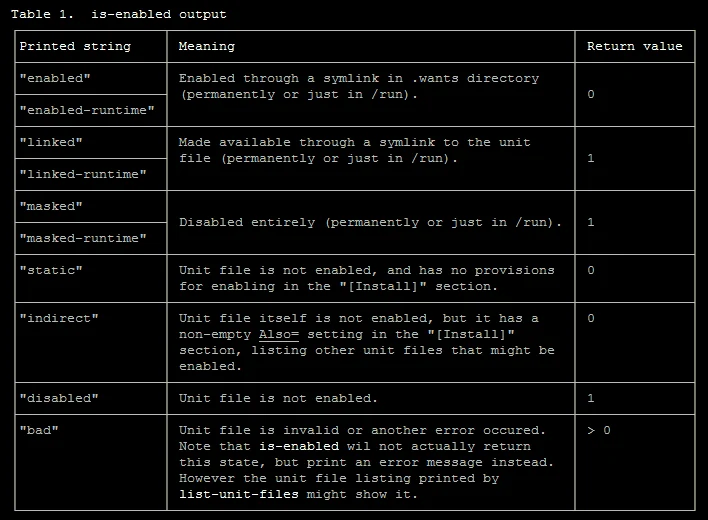
below table explains more on the exit code of various is-enabled output
7. Listing the dependencies of the service
Many times a system service is dependent on multiple other services for its proper functioning, to check the same use below command
[root@golinuxhub ~]# systemctl list-dependencies nfs-server.service
 nfs-server.service
 ● ├─auth-rpcgss-module.service
 ● ├─nfs-config.service
 ● ├─nfs-idmapd.service
 ● ├─nfs-mountd.service
 ● ├─proc-fs-nfsd.mount
 ● ├─rpc-statd-notify.service
 ● ├─rpc-statd.service
 ● ├─rpcbind.socket
 ● ├─system.slice
 ● ├─network-online.target
 ● │ └─NetworkManager-wait-online.service
 ● └─network.target
You can use "--plain" to display this list as a plain text rather than a tree
[root@golinuxhub ~]# systemctl list-dependencies nfs-server.service --plain
 nfs-server.service
   auth-rpcgss-module.service
   nfs-config.service
   nfs-idmapd.service
   nfs-mountd.service
   proc-fs-nfsd.mount
   rpc-statd-notify.service
   rpc-statd.service
   rpcbind.socket
   system.slice
   network-online.target
   NetworkManager-wait-online.service
   network.target
Any of the dependency service needed by the main service to start must be "active and running" or else the main service will fail to start. Assuming here I stop rpc-statd.service which is needed for "nfs-server.service"
[root@golinuxhub ~]# systemctl stop rpc-statd.service
Lets validate the same
[root@golinuxhub ~]# systemctl status rpc-statd.service
 ● rpc-statd.service - NFS status monitor for NFSv2/3 locking.
    Loaded: loaded (/usr/lib/systemd/system/rpc-statd.service; static; vendor preset: disabled)
    Active: inactive (dead) since Mon 2017-12-25 19:40:55 IST; 2s ago
  Main PID: 988 (code=exited, status=0/SUCCESS)

 Dec 25 19:19:53 golinuxhub.lab systemd[1]: Starting NFS status monitor for NFSv2/3 locking....
 Dec 25 19:19:53 golinuxhub.lab rpc.statd[988]: Version 1.3.0 starting
 Dec 25 19:19:53 golinuxhub.lab rpc.statd[988]: Flags: TI-RPC
 Dec 25 19:19:54 golinuxhub.lab systemd[1]: Started NFS status monitor for NFSv2/3 locking..
 Dec 25 19:40:55 golinuxhub.lab systemd[1]: Stopping NFS status monitor for NFSv2/3 locking....
 Dec 25 19:40:55 golinuxhub.lab systemd[1]: Stopped NFS status monitor for NFSv2/3 locking..
Now since one of the dependent service is dead lets check the status of our "nfs-server.service", so as expected the service has gone dead.
[root@golinuxhub ~]# systemctl status nfs-server
 ● nfs-server.service - NFS server and services
    Loaded: loaded (/usr/lib/systemd/system/nfs-server.service; disabled; vendor preset: disabled)
    Active: inactive (dead) since Mon 2017-12-25 19:26:28 IST; 14min ago
  Main PID: 1027 (code=exited, status=0/SUCCESS)

 Dec 25 19:19:54 golinuxhub.lab systemd[1]: Starting NFS server and services...
 Dec 25 19:19:55 golinuxhub.lab systemd[1]: Started NFS server and services.
 Dec 25 19:26:28 golinuxhub.lab systemd[1]: Stopping NFS server and services...
 Dec 25 19:26:28 golinuxhub.lab systemd[1]: Stopped NFS server and services.
If I attempt to start the "nfs-server.service" directly it will attempt to start all the ndecessary dependent services
[root@golinuxhub ~]# systemctl start nfs-server.service
It took some time to start the service this time, lets check the status
[root@golinuxhub ~]# systemctl status nfs-server.service
 ● nfs-server.service - NFS server and services
    Loaded: loaded (/usr/lib/systemd/system/nfs-server.service; disabled; vendor preset: disabled)
    Active: active (exited) since Mon 2017-12-25 19:41:49 IST; 10s ago
   Process: 1761 ExecStart=/usr/sbin/rpc.nfsd $RPCNFSDARGS (code=exited, status=0/SUCCESS)
   Process: 1756 ExecStartPre=/bin/sh -c /bin/kill -HUP `cat /run/gssproxy.pid` (code=exited, status=0/SUCCESS)
   Process: 1755 ExecStartPre=/usr/sbin/exportfs -r (code=exited, status=0/SUCCESS)
  Main PID: 1761 (code=exited, status=0/SUCCESS)
    CGroup: /system.slice/nfs-server.service

 Dec 25 19:41:49 golinuxhub.lab systemd[1]: Starting NFS server and services...
 Dec 25 19:41:49 golinuxhub.lab systemd[1]: Started NFS server and services.
So the "nfs-server.service" is UP and so is the "rpc-statd.service" we stopped earlier
[root@golinuxhub ~]# systemctl status rpc-statd.service
 ● rpc-statd.service - NFS status monitor for NFSv2/3 locking.
    Loaded: loaded (/usr/lib/systemd/system/rpc-statd.service; static; vendor preset: disabled)
    Active: active (running) since Mon 2017-12-25 19:41:19 IST; 4min 17s ago
   Process: 1751 ExecStart=/usr/sbin/rpc.statd $STATDARGS (code=exited, status=0/SUCCESS)
  Main PID: 1752 (rpc.statd)
    CGroup: /system.slice/rpc-statd.service
            └─1752 /usr/sbin/rpc.statd

 Dec 25 19:41:19 golinuxhub.lab systemd[1]: Starting NFS status monitor for NFSv2/3 locking....
 Dec 25 19:41:19 golinuxhub.lab rpc.statd[1752]: Version 1.3.0 starting
 Dec 25 19:41:19 golinuxhub.lab rpc.statd[1752]: Flags: TI-RPC
 Dec 25 19:41:19 golinuxhub.lab systemd[1]: Started NFS status monitor for NFSv2/3 locking..
8. Listing the dependencies of specific target
To see what services and other units (service, mount, path, socket, and so on) are associated with a particular target and are configured as dependencies for the specified target.
[root@golinuxhub ~]# systemctl list-dependencies multi-user.target
 multi-user.target
 ● ├─abrt-ccpp.service
 ● ├─abrt-oops.service
 ● ├─abrt-vmcore.service
 ● ├─abrt-xorg.service
 ● ├─abrtd.service
 ● ├─atd.service
 ● ├─auditd.service
 ● ├─avahi-daemon.service
 ● ├─brandbot.path
 ● ├─chronyd.service
 ● ├─crond.service
 ● ├─cups.path
 ● ├─cups.service
 ● ├─dbus.service
 ● ├─initial-setup-reconfiguration.service
 ● ├─irqbalance.service
This will give a long list of output (I have trimmed the output here)
The list shows the list of services and unit files which are dependency for this target and to boot up to this target level these list of services and unit files will be called.
9. Listing all units available on the system
To list all units installed on the system, along with their current states, type the following:
[root@golinuxhub ~]# systemctl list-unit-files
 UNIT FILE                                     STATE
 proc-sys-fs-binfmt_misc.automount             static
 dev-hugepages.mount                           static
 dev-mqueue.mount                              static
 proc-fs-nfsd.mount                            static
 proc-sys-fs-binfmt_misc.mount                 static
 sys-fs-fuse-connections.mount                 static
 sys-kernel-config.mount                       static
 sys-kernel-debug.mount                        static
 tmp.mount                                     disabled
 var-lib-nfs-rpc_pipefs.mount                  static
 brandbot.path                                 disabled
 cups.path                                     enabled
 systemd-ask-password-console.path             static
 systemd-ask-password-plymouth.path            static
 systemd-ask-password-wall.path                static

(Output is trimmed)

 chrony-dnssrv@.timer                          disabled
 fstrim.timer                                  disabled
 mdadm-last-resort@.timer                      static
 systemd-readahead-done.timer                  indirect
 systemd-tmpfiles-clean.timer                  static

375 unit files listed.
10. View the entire configuration of the service unit file
Use "--show" flag to view the property of a unit file as shown below.
[root@golinuxhub ~]# systemctl show nfs-server.service
 Type=oneshot
 Restart=no
 NotifyAccess=none
 RestartUSec=100ms
 TimeoutStartUSec=0
 TimeoutStopUSec=1min 30s
 WatchdogUSec=0
 WatchdogTimestampMonotonic=0
 StartLimitInterval=10000000
 StartLimitBurst=5
 StartLimitAction=none
 FailureAction=none
 PermissionsStartOnly=no
 RootDirectoryStartOnly=no
 RemainAfterExit=yes
 GuessMainPID=yes
 MainPID=0
 ControlPID=0
 FileDescriptorStoreMax=0
 StatusErrno=0
 Result=success

(Output trimmed)

 ConditionResult=yes
 AssertResult=yes
 ConditionTimestamp=Mon 2017-12-25 19:41:49 IST
 ConditionTimestampMonotonic=1335238631
 AssertTimestamp=Mon 2017-12-25 19:41:49 IST
 AssertTimestampMono
11. View the content of a unit file
You can use "cat" flag to view the content of the unit file owned by the respective servive
cat PATTERN...
Show backing files of one or more units. Prints the "fragment" and "drop-ins" (source files) of units. Each file is preceded by a comment which includes the file name.
Use command as shown below
[root@golinuxhub ~]# systemctl cat sshd.service
 # /usr/lib/systemd/system/sshd.service
 [Unit]
 Description=OpenSSH server daemon
 Documentation=man:sshd(8) man:sshd_config(5)
 After=network.target sshd-keygen.service
 Wants=sshd-keygen.service

 [Service]
 Type=notify
 EnvironmentFile=/etc/sysconfig/sshd
 ExecStart=/usr/sbin/sshd -D $OPTIONS
 ExecReload=/bin/kill -HUP $MAINPID
 KillMode=process
 Restart=on-failure
 RestartSec=42s

 [Install]
 WantedBy=multi-user.target
I hope the article was useful.